
[Phase-3][Binding] HIP-37 Set EPNS as a delegate for PoH notification channel
HIP: 37 title: Set EPNS as a delegate for PoH notification channel author: Aleix (aleix@kleros.io) status: Phase 3 created: 2022-02-02
Abstract
The PoH DAO, being the rightful owner of the PoH notification channel needs to set up a delegate such that the delegate has permission to send push notifications to everyone on the channel. After setting EPNS as delegate they will be able to notify, to everyone that subscribes, relevant information regarding their PoH profile. The notifications that they will be able to send initially are defined below in the Specification section, note that the code for these notifications will be open source and we will be able to modify and expand it with more notifications.
Motivation
The EPNS team has been working on giving PoH a good notification system, this action on-chain is the last step before they can start sending notifications.
Specification
As commented on the last PoH community call, the PoH governor (and thus the PoH DAO) is the owner of the Proof Of Humanity notification channel:
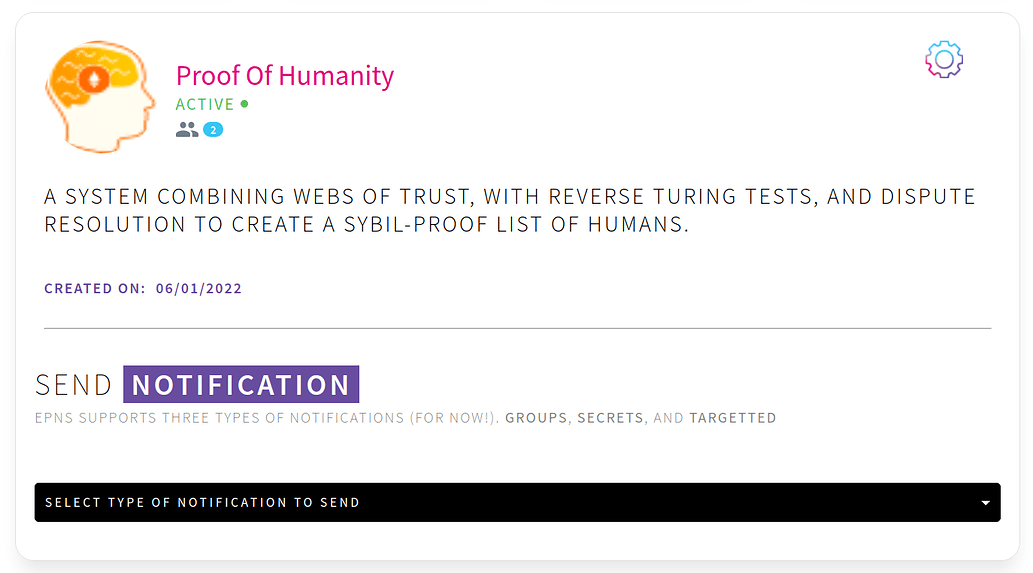 This means that now we have to set the EPNS address (0xCACf63E473ABB9d091F62d92E1D2d8ff43a02a9E) as a delegate, to allow them to send notifications on the channel. The notifications that they will be sending, for now, are:
- Your profile has been accepted
- Your profile has a removal request
- Your profile has been challenged
- Your profile is about to expire
- New evidence has been uploaded (They will give us access to the repository with the notifications code, so we can improve and add new notifications.)
Implementation
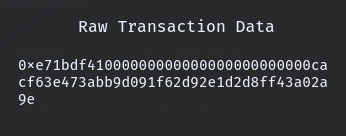
To implement this HIP we have to execute the following transaction on the Ethereum mainnet chain: Recipient: 0xb3971bcef2d791bc4027bbfedfb47319a4aaaaaa Transaction Data: 0xe71bdf41000000000000000000000000cacf63e473abb9d091f62d92e1d2d8ff43a02a9e
Appendix
Steps to validate the transaction data.
- With Frame wallet installed, add the PoH governor (0x327a29fcE0a6490E4236240Be176dAA282EcCfdF) as a watch only address.
- Visit https://app.epns.io/ and connect.
- Click on the PoH button to enter the channel administration tab.
- Click on the gear icon and then “Add Delegate”.
- Paste the EPNS address: 0xCACf63E473ABB9d091F62d92E1D2d8ff43a02a9E and click on “Add Delegate”
- On the Frame wallet pop-up click on “Sending data” and validate that the raw transaction data is the same one that is presented on this proposal.
| Voter | Cast Power | Vote & Rationale |
|---|---|---|
 0x2A52...8c8676 | 54 | Approve HIP |
 0xE7f1...3979bC | 15 | Approve HIP |
 0x5880...02DBDF | 15 | Approve HIP |
 0xA72e...b20f5c | 8 | Approve HIP |
 0x5886...e608e5 | 6 | Approve HIP |
VOTE POWER
Proposal Status
- Wed February 02 2022, 02:00 pmVoting Period Starts
- Wed February 09 2022, 02:00 pmEnd Voting Period
Current Results
1-Approve HIP
190
2-Make no changes
1